


← All help topics · Instructor
Check the offer, access rules and learner-facing page together before making the course available.
On desktop #
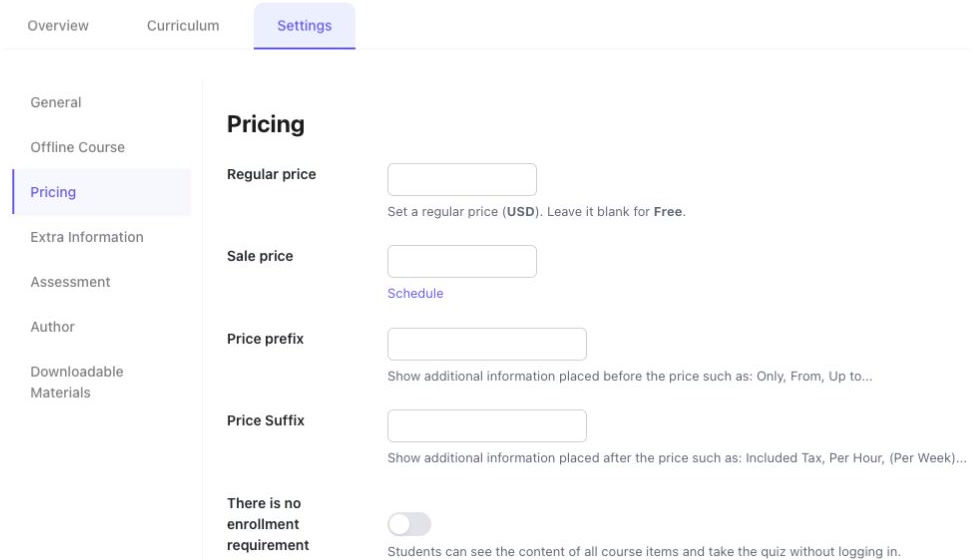
- Open the course and choose Settings → Pricing.
- Enter the intended Regular price in the currency displayed. The form states that leaving it blank makes the course free.
- If using a Sale price, inspect Schedule and set the intended dates.
- Use Price prefix or Price suffix only for clear additional information; these labels do not replace the amount or access terms.
- Review There is no enrollment requirement carefully. The form says this lets visitors see course items and take quizzes without logging in.
- Save the intended settings, then use Preview to check what learners see.
On mobile #
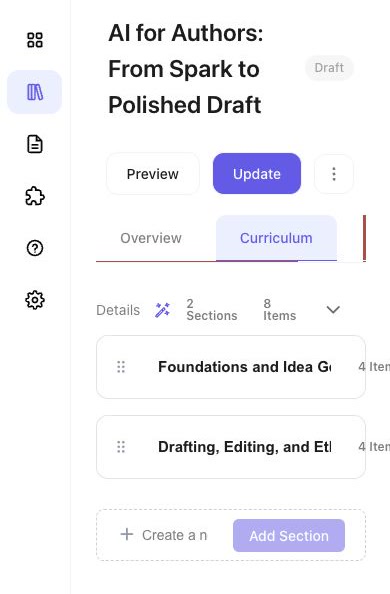
Use a desktop browser for arranging the curriculum and changing detailed course settings. On a narrow screen, some controls can be clipped or fail to expand. Select Desktop above to read the editing instructions.
Review before publication #
- Check the course title, description, language, image and intended audience.
- Review each section and activity, the assessment rule, access duration and materials.
- Check the actual price and what is accessible without enrolment.
- Review the status and visibility controls in Overview. Use the publication or review action available to your account; keep an unfinished course as Draft.
- Reopen the learner-facing page to verify the final result.
Support learners after publication #
Return to My Teaching for your courses and practitioner area. When a learner reports missing access or a result, ask for the course, activity and order reference where relevant. Check the course’s access and assessment settings before changing the learner’s work.
Commercial and rights questions #
A course’s displayed price does not establish an instructor payout rate or refund policy. Use the applicable agreement and Public offer for commercial terms. Upload materials you are entitled to distribute and describe clearly what the learner receives.
Interface reviewed on 12 November 2026. Screens shown are from the development environment.


